What Is DNS? A Simple Guide to the Domain Name System
 NeeRoz M
What Is DNS? A Simple Guide to the Domain Name System


Have you ever wondered what happens when you type a website address such as www.google.com into your browser? Within seconds, the website appears on your screen. But computers do not actually find websites using names like Google.com. They communicate using IP addresses.
This is where DNS (Domain Name System) comes in.
What Is DNS?
DNS is often described as the phonebook of the internet. It translates easy-to-remember domain names, such as www.google.com, into IP addresses that computers can understand.
For example:
www.google.com → 142.250.190.78
Instead of remembering a long numerical IP address for every website, users can simply type a familiar domain name.
How Does DNS Work?
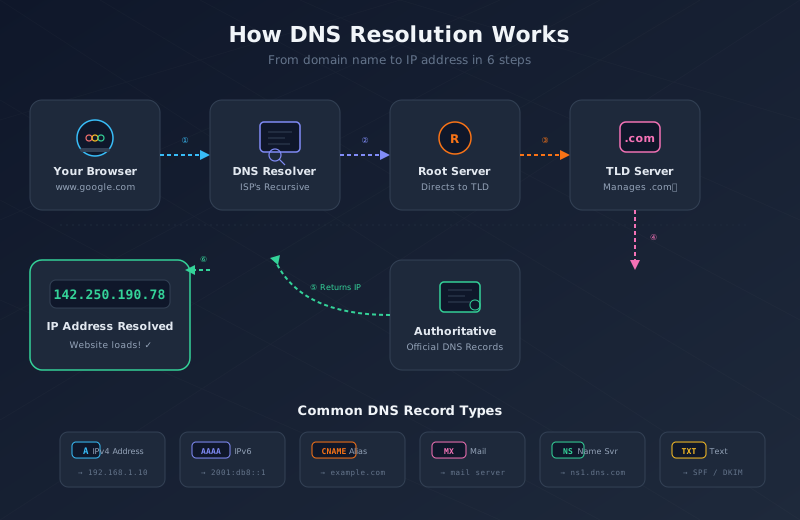
When you enter a website address into your browser, several steps happen behind the scenes:
1. You Enter a Website Address
You type a domain name such as www.example.com into your browser.
2. Your Request Goes to a DNS Resolver
Your device sends the request to your Internet Service Provider’s DNS resolver. The resolver is responsible for finding the IP address associated with the domain name.
3. The Resolver Contacts the Root DNS Server
If the answer is not already available, the resolver asks a root DNS server where it can find information about the requested domain.
4. The TLD DNS Server Is Contacted
The root server directs the resolver to the appropriate Top-Level Domain (TLD) DNS server, such as the server responsible for .com, .org, or .net.
5. The Authoritative DNS Server Is Asked
The resolver then contacts the authoritative DNS server for the specific domain. This server contains the official DNS records for that website.
6. The IP Address Is Provided
The authoritative DNS server sends the correct IP address back to the DNS resolver.
7. The Resolver Sends the Answer to Your Browser
The resolver gives the IP address to your browser. Your browser can now connect to the web server hosting the website.
8. The Website Loads
Finally, your browser uses the IP address to request the website, and the webpage appears on your screen.
In simple terms:
Domain name → DNS → IP address → Website
Common Types of DNS Records
DNS uses different types of records for different purposes.
A Record
An A record maps a domain name to an IPv4 address.
example.com → 192.168.1.10
AAAA Record
An AAAA record maps a domain name to an IPv6 address.
example.com → 2001:db8::1
CNAME Record
A CNAME record maps one domain name to another domain name.
www.example.com → example.com
MX Record
An MX (Mail Exchange) record identifies the mail servers responsible for receiving email for a domain.
NS Record
An NS (Name Server) record specifies the DNS servers that are authoritative for a domain.
TXT Record
A TXT record stores text information associated with a domain. It can be used for things such as email verification, SPF, and other domain-related configurations.
Example: What Happens When You Visit Google?
Suppose you type:
www.google.com
Your browser needs Google’s IP address before it can connect to the correct server.
DNS looks up the domain and returns an IP address, such as:
142.250.190.78
Your browser then uses that IP address to connect to Google’s server and load the website.
So, DNS acts as the bridge between the human-friendly website name and the computer-friendly IP address.
Why Is DNS Important?
DNS is one of the fundamental systems that makes the internet easy to use.
It:
- Makes websites easy to access using memorable names
- Translates domain names into IP addresses
- Helps route email to the correct mail servers
- Supports website availability and performance
- Helps with load balancing
- Can contribute to security and traffic management
Without DNS, using the internet would be much more difficult because users would have to remember numerical IP addresses instead of simple domain names.
What Is DNS Caching?
DNS does not always need to perform the entire lookup process every time you visit a website.
To make browsing faster, DNS results can be temporarily stored in a cache. When the same domain is requested again, the resolver may provide the stored IP address instead of performing a new lookup.
The amount of time a DNS record can remain in the cache is controlled by its TTL (Time to Live).
For example, if a DNS record has a TTL of one hour, it can normally remain cached for that period before needing to be refreshed.
Types of DNS Servers
There are several important components involved in DNS resolution.
- Recursive DNS resolver: Finds the requested DNS information on behalf of the user.
- Root DNS servers: Direct requests toward the appropriate top-level domain servers.
- TLD DNS servers: Handle domains under extensions such as
.com,.org, and.net. - Authoritative DNS servers: Provide the official DNS information for a particular domain.
Together, these systems allow a domain name to be converted into the information needed to reach the correct server.
DNS in Simple Words
Think of DNS like the contacts list on your phone.
You might save someone’s name as “Alex” instead of remembering their phone number. When you want to contact Alex, your phone looks up the number associated with that name.
DNS works in a similar way:
- Website name = Contact name
- IP address = Phone number
You remember the website name, while DNS handles the complicated IP address lookup for you.
Conclusion
DNS is a critical part of the internet. It connects human-friendly domain names with the IP addresses that computers use to communicate.
The next time you type a website address into your browser and it loads almost instantly, remember that DNS is working behind the scenes to help your browser find the right server.
In short, DNS turns easy-to-remember domain names into computer-friendly IP addresses, making the internet much easier and faster to use.
Table of Contents